A few years ago, managing business finances usually meant waiting. Waiting for reports, waiting for numbers to be finalised, and sometimes even waiting just to understand where the business actually stood.
That delay was almost accepted as normal.
But once businesses started using cloud systems, especially Cloud Accounting Software, that waiting slowly disappeared. Financial data became easier to access, easier to understand, and—more importantly—available when it was actually needed.
Financial Data Is No Longer “Delayed”
In traditional setups, financial reporting followed a fixed cycle. You closed the books, generated reports, and reviewed them after everything was final.
Now, things feel different.
With cloud-based systems, financial data updates continuously. You don’t have to prepare a report just to get a basic idea of your position. You can check:
- How much money is coming in
- What’s being spent
- Which payments are still pending
This doesn’t replace formal reporting, but it reduces the reliance on it for everyday decisions.
Routine Work Becomes Less Time-Consuming
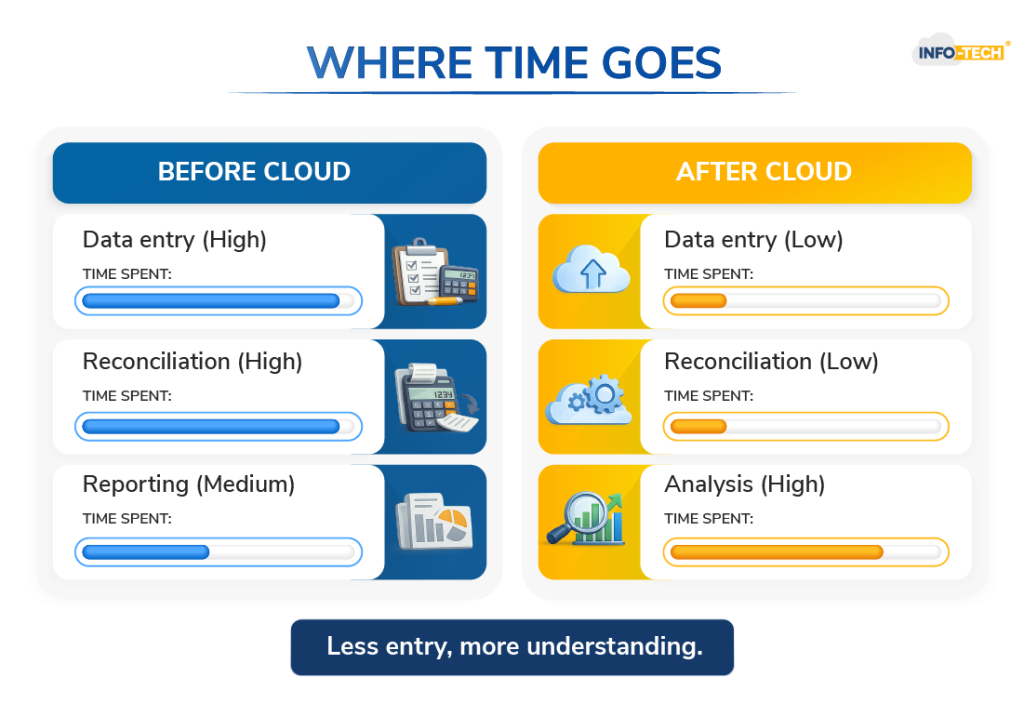
A big part of financial management used to be repetitive work. Entering transactions, matching records, correcting small errors—it all took time.
With Cloud Accounting Software, much of that work is handled in the background.
Instead of doing everything manually:
- Bank transactions sync directly into the system
- Expenses are grouped automatically
- Invoices can be created and tracked in one place
The role of finance teams doesn’t disappear. It simply shifts. There’s less focus on entering data and more focus on reviewing it.
Accuracy Improves Without Extra Effort
When work is manual, small mistakes are hard to avoid. A number entered incorrectly or a missed entry can affect reports later on.
Cloud systems reduce this risk by limiting manual input. Since data flows directly from connected sources and calculations are automated, records tend to be more consistent.
Over time, this builds confidence in the numbers—which is important for both reporting and planning.
Access Becomes Flexible
Financial systems are no longer tied to one location.
With cloud access, businesses can review and manage finances from anywhere. Whether it’s a business owner checking reports or an accountant updating records, everything can be done without being physically present in the office.
This flexibility doesn’t just save time—it helps work move faster.
Teams Work More Smoothly Together
Finance doesn’t operate alone anymore.
Cloud systems allow different teams to access the same financial data when needed. For example:
- Sales teams can check invoice statuses
- Managers can review dashboards
- HR can connect payroll data
Since everyone is working from the same system, there’s less confusion and fewer delays.
Decision-Making Becomes More Practical
When financial data is delayed, decisions are often based on estimates.
With real-time data, businesses can see what’s happening more clearly. They can identify spending patterns, track income, and adjust plans when needed.
This doesn’t make decisions easier, but it makes them more reliable.
Costs Are Managed Differently
Cloud systems come with subscription costs, which can seem like an added expense.
However, they often reduce other costs over time, such as:
- IT infrastructure and maintenance
- Manual labour
- Time spent correcting errors
The savings are not always immediate, but they build gradually.
Security Concerns Are Common—But Often Overestimated
It’s natural to question the safety of storing financial data online.
Most Cloud Accounting Software platforms are built with strong security measures, including data encryption and automatic backups. For many businesses, this level of protection is actually stronger than traditional setups.
Easier to Scale as the Business Grows
As businesses expand, their financial systems need to adapt.
Cloud systems allow businesses to scale without major changes. New users can be added, features can be upgraded, and integrations can be introduced without replacing the entire system.
This makes growth easier to manage from a financial perspective.
Final Thoughts
Adopting cloud computing doesn’t completely change financial management overnight. But it does make everyday processes more straightforward.
With Cloud Accounting Software, businesses spend less time dealing with delays and manual tasks, and more time understanding their financial position.
In the long run, that shift helps businesses stay more organised, respond faster, and manage their finances with greater clarity.
Cloud Accounting FAQs
What is Cloud Accounting Software and how does it work?
Cloud Accounting Software is an online system that helps businesses manage their finances in real time. Instead of storing data on a single computer, everything is stored securely on the cloud. It automatically records transactions, syncs with bank accounts, and generates reports, making financial management more accessible and less dependent on manual work.
How does cloud computing improve financial management for businesses?
Cloud computing improves financial management by giving businesses instant access to their financial data. Instead of waiting for reports, companies can track income, expenses, and cash flow as they happen. This helps in making quicker decisions, spotting issues early, and managing finances with more clarity and control.
Is Cloud Accounting Software suitable for small businesses?
Yes, Cloud Accounting Software is especially useful for small businesses. It reduces the need for complex systems and manual processes, which can be time-consuming and costly. Small businesses can manage their finances more efficiently, access data from anywhere, and scale their systems as they grow without major changes.
Is cloud-based financial data secure?
Most cloud accounting platforms are built with strong security measures like encryption, secure logins, and automatic backups. In many cases, they offer better protection than traditional systems. While no system is completely risk-free, cloud solutions are generally considered safe when used with proper access controls and security practices.
